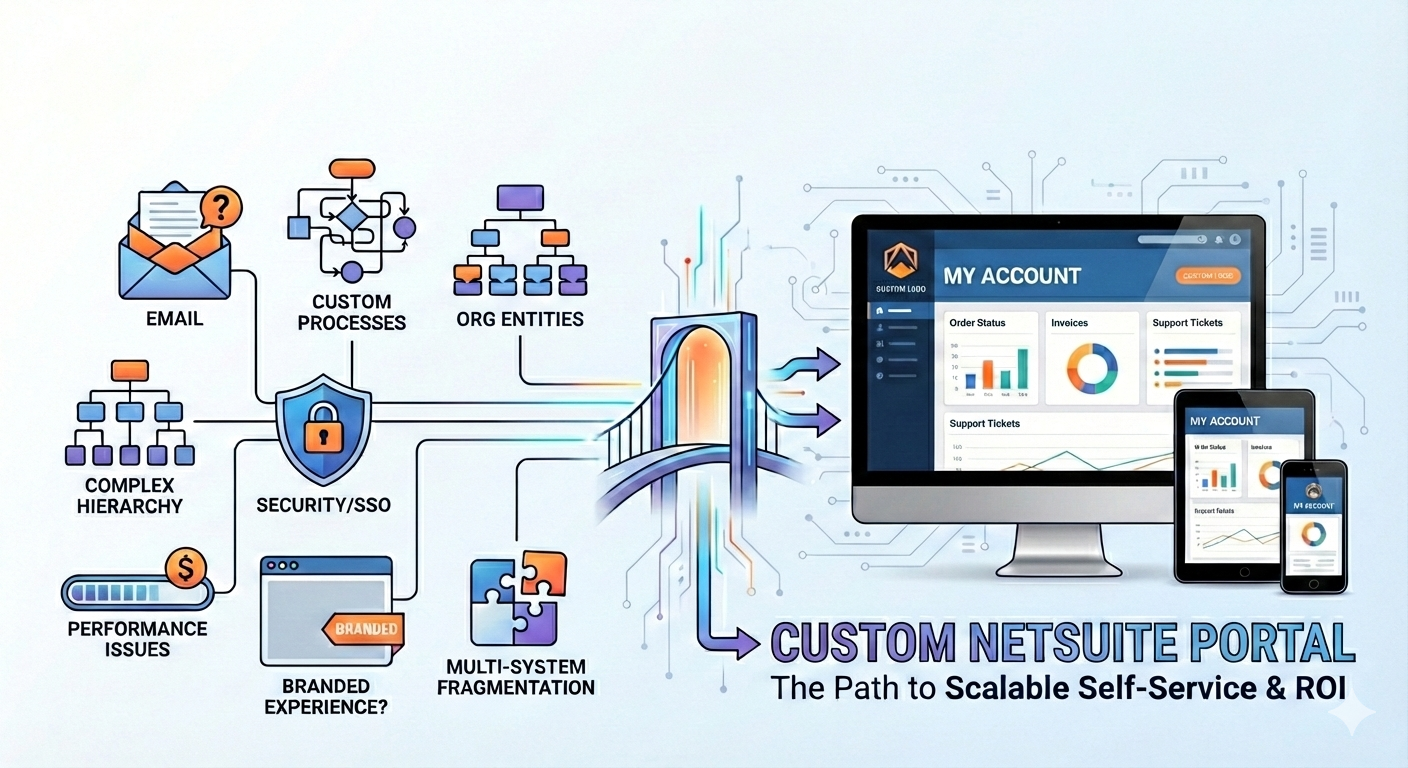
Most mid-market teams don't wake up wanting "a custom NetSuite portal." They want fewer emails, faster cash collection, fewer support tickets, cleaner order visibility, and a self-service experience customers (and vendors, partners, or employees) will actually use.
A custom portal becomes the right move when your current NetSuite experience, whether that's Customer Center, Vendor Center, Partner Center, Employee Center, or SuiteCommerce "My Account," can't deliver the workflow, usability, security model, or scale your business needs.
Below are 7 clear signs you're at that point, plus how to validate the decision without turning it into a costly science project.
First, what counts as a "custom NetSuite portal"?
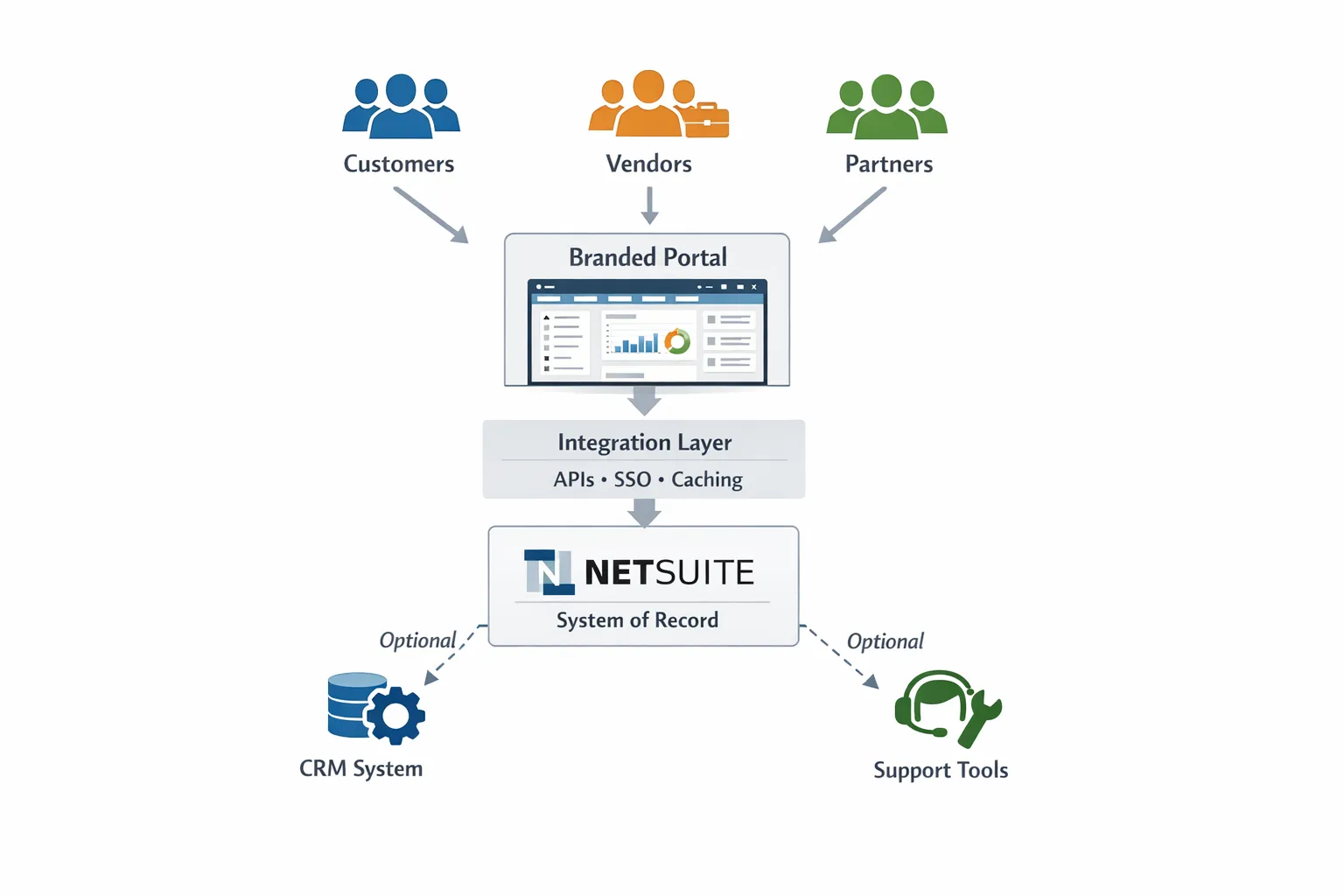
A custom NetSuite portal is any tailored front-end experience (web or mobile) that gives external or internal users self-service access to NetSuite-driven data and workflows, with:
- A UI designed for a specific audience (customers, distributors, vendors, franchisees, field techs, sales reps)
- A security and permissions layer mapped to business rules (not just "NetSuite screens")
- NetSuite as the system of record (most common), sometimes alongside CRM, WMS, 3PL, support, or billing systems
That portal might be fully custom-built, built on a portal layer that sits on top of NetSuite, or implemented via a third-party platform that integrates with NetSuite.
If you want a deeper evaluation of native options versus upgrades, DataOngoing breaks that down in Is NetSuite's Native Portal Enough? and a more tactical limitations guide in NetSuite Customer Portal Limitations: Mid-Market Fixes. This article focuses on the decision signals.
7 signs you need a custom NetSuite portal
1) Your team still creates tickets, handles emails and phone calls
The most reliable indicator is behavioral, not technical: if customers, vendors, or internal users are routinely contacting your team for information that lives in NetSuite, your portal gap is costing you in labor.
Common symptoms:
- Customers email support for order status, invoices, or RMAs because they have no self-service option or the existing portal is too confusing
- Vendors ask AP for payment status because they can't easily find remittance details
- Internal teams build spreadsheets because NetSuite screens are too hard to navigate for occasional users
When self-service fails or doesn't exist, your cost shows up as labor, not software. If your support, AR, or ops teams are acting as the interface to NetSuite, you're already paying for a portal—it's just made of people.
A practical validation: pick your top 3 repetitive request types (order status, invoice copies, return eligibility, subscription changes, etc.) and measure volume for two weeks. If those requests map cleanly to data already in NetSuite, your portal gap is workflow and UX, not ERP capability.
2) You need to expose custom records or custom processes (and it's painful)
Many mid-market NetSuite accounts evolve quickly: custom records, custom transaction flows, approval logic, entitlement models, and industry-specific objects.
If your portal users need to interact with those customizations, native portal experiences can become hard to maintain because:
- You're trying to "fit" a modern workflow into screens designed for full NetSuite users
- Small changes require developer time, testing, and careful role/permission review
- You struggle to present custom data in a clean, task-based way
This is the point where a portal stops being "a login" and becomes a product. A custom portal lets you present exactly what users need, in the language they use, with guardrails that reflect how your business actually runs.
3) Your customer structure is complex (multi-entity, hierarchies, delegated admin)
If you sell B2B, your "customer" is rarely a single person. It's a hierarchy.
You may need capabilities like:
- Parent and child accounts with different visibility rules
- Multiple ship-to locations, cost centers, or projects under one master agreement
- Delegated administration (your customer's admin can add/remove users, control access, and manage permissions)
When these patterns matter, the portal needs a robust identity and authorization model, and it needs to feel intuitive for non-ERP users.
A custom portal is often justified when the business requirement is: "Let the customer manage their own org and users," because that reduces ongoing work for your team and improves adoption.
4) You require SSO, modern identity controls, and tighter security than a basic setup
Security is not just about "can they log in." It's also about:
- Single sign-on (SSO) for enterprise customers or internal users
- MFA enforcement and conditional access expectations
- Session timeouts, auditability, and clear separation between entities
- Consistent user lifecycle management (provisioning, deprovisioning)
NetSuite can participate in secure identity architectures, but many mid-market teams discover the last mile is where effort spikes: mapping roles properly, preventing overexposure, making logins seamless across tools, and ensuring you can prove who saw what.
If security requirements are rising (because of enterprise deals, audits, or incidents), a portal can be a way to centralize and standardize identity while still keeping NetSuite as the source of truth.
5) Performance and usability are now a revenue or cashflow issue
A portal becomes strategic when speed and clarity affect money.
Examples:
- Customers delay payment because invoices are hard to find, download, or reconcile
- Distributors place fewer orders because reorder workflows take too long
- Service customers open tickets because they can't self-serve status, scheduling, or entitlements
Even if NetSuite is performing fine for internal power users, portal users are often occasional users on mobile devices. They need task-based UI that loads fast and reduces clicks.
If you suspect performance is part of the problem, start by validating whether it's NetSuite UI, workflows, scripts, or integrations. This pairs well with DataOngoing's performance triage guide: NetSuite UI Too Slow? Proven Fixes for Mid-Market Teams.
A custom portal often performs better for end users because you can introduce caching, simpler payloads, and purpose-built pages, while reducing heavy NetSuite page rendering.
6) You need a branded, guided experience (not "ERP screens exposed to the public")
Adoption lives and dies on user experience. Your portal is part of your product, especially if your service model depends on renewals, reorders, or support efficiency.
A custom portal becomes likely when you need:
- A branded UI that looks and feels like your company, not your ERP
- Guided workflows (wizards, smart defaults, validations, clear next steps)
- Content and education embedded in the flow (policies, SLA rules, return logic)
- Mobile-first experiences for field users, drivers, or technicians
This is not only "marketing polish." It's a conversion and retention lever because customers who can self-serve successfully tend to buy more and churn less.
7) You're stitching together multiple systems and the portal has to unify them
Mid-market stacks are rarely just NetSuite. You may have:
- A support desk for cases
- A CPQ or subscription/billing platform
- A 3PL/WMS and shipping tools
- A product platform or usage system
When users must jump between tools to complete one job, adoption drops and errors rise.
A custom portal becomes valuable when it can provide "one front door" across systems, with NetSuite still governing financial truth. Your portal can orchestrate actions and present a unified view, without forcing users to understand your internal architecture.
If your broader goal is unified systems, not just a portal, see IT Service Solutions That Scale With Your ERP for patterns that reduce fragmentation.
A quick way to score the decision
If you're seeing 3 or more of the signs above in a meaningful way (measured by ticket volume, AR delays, order friction, or security demands), you should at least model a custom portal option.
Here's a practical scoring table you can use with Ops, Finance, Support, and IT in one conversation.
| Sign | Who feels it first | What it typically costs you | What a portal usually changes |
|---|---|---|---|
| Self-service still creates tickets | Support, CS, Ops | Labor, slower response, lower CSAT | Deflection, fewer contacts, faster resolution |
| Custom records/processes are hard to expose | IT, Ops | Dev backlog, fragile workflows | Task-based UX, faster iteration |
| Complex account hierarchies | Sales Ops, CS, Finance | Manual user admin, wrong visibility | Delegated admin, correct scoping |
| SSO/security requirements rising | IT, Compliance | Security risk, deal friction | Standardized identity, cleaner audits |
| Usability/performance hurts revenue or cash | Finance, Sales, Ops | Slower payments, fewer reorders | Faster flows, fewer steps, clearer actions |
| Need branded guided experience | Customer success, Product | Low adoption, churn risk | Higher adoption, better retention |
| Multi-system experience is fragmented | Everyone | Errors, rework, duplicate data entry | One front door, orchestration |
What to consider before you build anything
A portal is not automatically the answer. The goal is to remove friction at the lowest long-term cost.
Validate the "cheapest fix" first
Before committing to custom development, confirm whether these options meet the need:
- Simplifying roles, forms, and saved searches so users see less clutter
- Automating high-volume requests with better workflows and notifications
- Improving knowledge and support flows so users can self-serve without logging in
If the need is still real after that, you're in portal territory.
Compare your implementation paths (not just features)
There are multiple ways to get to "better portal," and the best choice depends on how unique your workflows are, how many systems are involved, and how fast you need ROI.
| Path | Best when | Tradeoffs to watch |
|---|---|---|
| Optimize native centers | Needs are simple, audience is small | UX constraints, limited flexibility for custom objects |
| SuiteCommerce account experiences | You already run commerce on it, need shopper-like flows | Licensing and implementation complexity can rise depending on scope |
| Third-party portal platform with NetSuite integration | You need a strong portal quickly with standard patterns | Integration depth varies, custom workflows can still require engineering |
| Custom portal (built to your specs) | You need unique workflows, identity model, or multi-system orchestration | Higher engineering responsibility, requires strong governance |
| Portal layer approach (NetSuite-connected, configurable) | You need speed plus NetSuite-native alignment | Still requires good architecture and ownership |
For reference on NetSuite's commerce and account capabilities, Oracle's NetSuite SuiteCommerce overview is a useful baseline: NetSuite SuiteCommerce.
What good looks like (the portal requirements that matter)
Whether you build, buy, or configure, successful mid-market portals share a few non-negotiables.
Clear jobs to be done
A portal should be designed around the top user jobs, not around NetSuite navigation. Examples include paying an invoice, tracking an order, requesting a return, managing users, downloading documents, or approving a transaction.
A permission model you can explain on one page
If you cannot clearly describe who can see what (and why) in a simple matrix, you will ship a portal that either blocks users or exposes too much.
Observable performance and reliability
Treat the portal like a production system:
- Monitor latency for key actions
- Log errors with enough context to fix them quickly
- Design for peak loads (invoice runs, month-end, major shipments)
This is one reason many mid-market teams prefer a managed service model, because reliability is operational work, not a one-time project.
A measurable ROI thesis
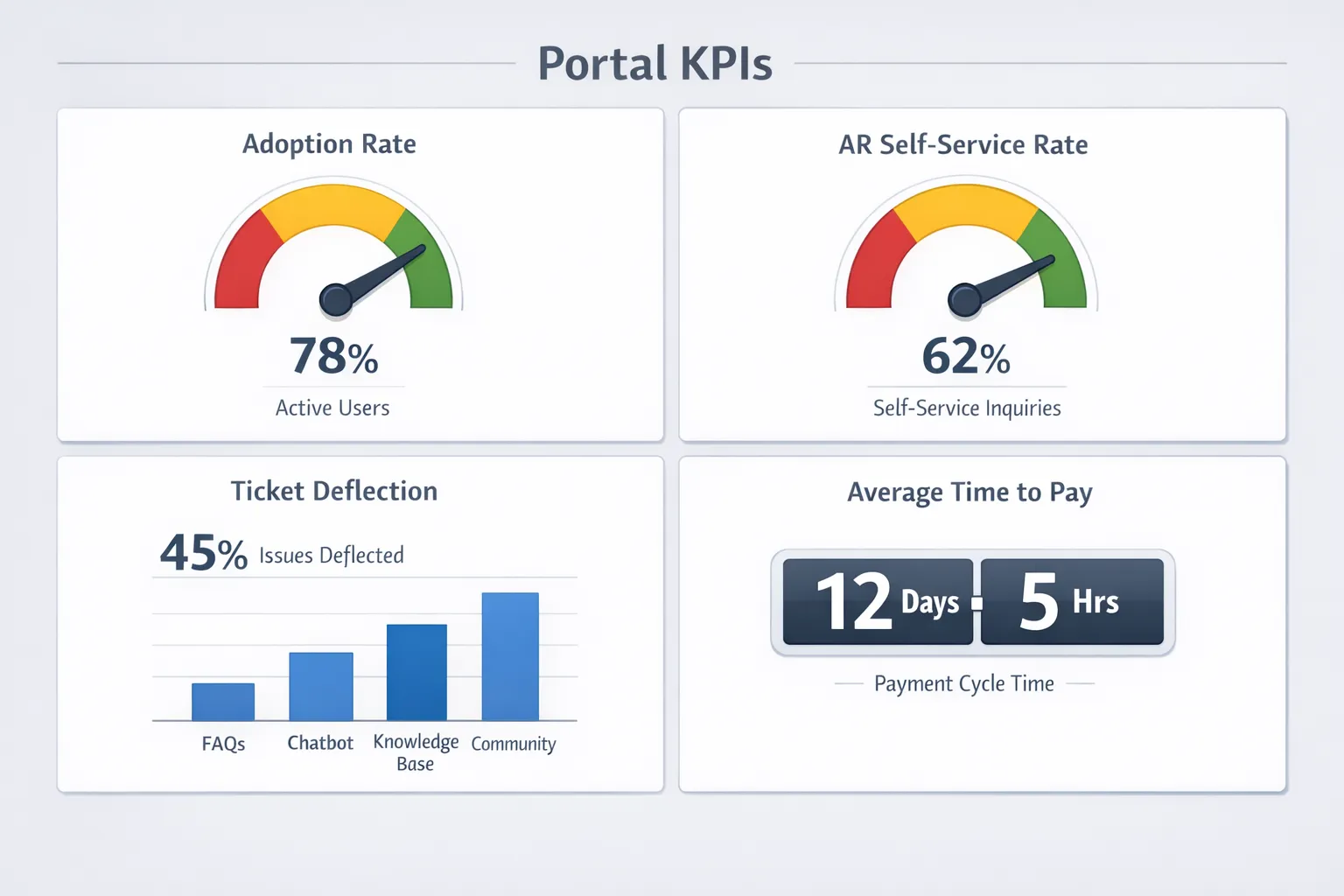
Portals justify themselves when they move measurable numbers. Pick a small set of metrics tied to outcomes your leadership cares about, for example:
- AR self-service rate (percent of invoices paid or reconciled without human help)
- Average time to pay (or DSO impact, if you track it)
- Ticket deflection rate for "where is my order," invoice copy, and simple RMAs
- Portal activation and repeat usage (30/60/90 day cohorts)
If you want a CFO-friendly way to model and defend ROI, DataOngoing's Managed Service ROI: A Practical Guide for CFOs provides a framework you can reuse for a portal business case.
When a custom portal is a "yes" (and when it's a "not yet")
A custom portal is usually a yes when the portal is directly tied to:
- Cash collection speed
- Revenue retention and reorder frequency
- Support cost reduction at scale
- Enterprise deal requirements (SSO/security)
- Multi-system complexity that users should not have to manage
It's often not yet when:
- You have low portal volume and mostly ad hoc requests
- Your workflows are still changing weekly (stabilize first)
- The real issue is data quality or broken internal processes upstream
How DataOngoing helps (without turning it into a never-ending build)
DataOngoing works with mid-market companies on NetSuite ERP, AI automation, and system integrations using a managed service approach focused on measurable ROI. If you're seeing several of the signs above, the fastest path is usually a short discovery that answers three questions:
- What should users be able to do in the portal, and what should stay inside NetSuite?
- What security model is required (roles, hierarchies, delegated admin, SSO)?
- What is the smallest version that produces measurable ROI in 60 to 90 days?
If you want a second opinion on whether you need a custom NetSuite portal (and which path is smartest for your situation), start with the related baseline read: Is NetSuite's Native Portal Enough?, then schedule a call with DataOngoing to discuss your workflow, constraints, and ROI goals.
DataOngoing Team
Technology Consulting Experts
DataOngoing helps mid-market companies achieve measurable ROI through AI automation, ERP expertise, and digital transformation.