
If your NetSuite customer portal is underused, slow, or missing must-have self-service features, you are not alone. Mid-market teams regularly outgrow the native Customer Center once order volumes, subsidiaries, and customer expectations increase. The good news is that most gaps can be closed with proven patterns that keep NetSuite as the system of record while upgrading the experience and results.
Below is a practical look at the most common NetSuite customer portal limitations and the mid-market fixes that deliver adoption, faster cash, and lower support load.
Quick context: what the NetSuite customer portal does well
The native Customer Center is a secure entry point that lets customers view transactions, check order status, print invoices, and create simple support cases. It is tied directly to your NetSuite data model, which means roles and saved searches govern what a customer can see. For organizations early in their ERP journey, this is a fast way to offer basic access without adding another platform. If you want a deeper overview of NetSuite itself, see our primer on what NetSuite is.
As your customer base, product catalog, and process complexity grow, constraints start to show.
The most common NetSuite customer portal limitations, and how to fix them
1) User experience and adoption
Limitation: The default UI is utilitarian, branding is limited, and navigation is not optimized for mobile. Search can feel slow on large datasets, which hurts adoption.
Mid-market fixes:
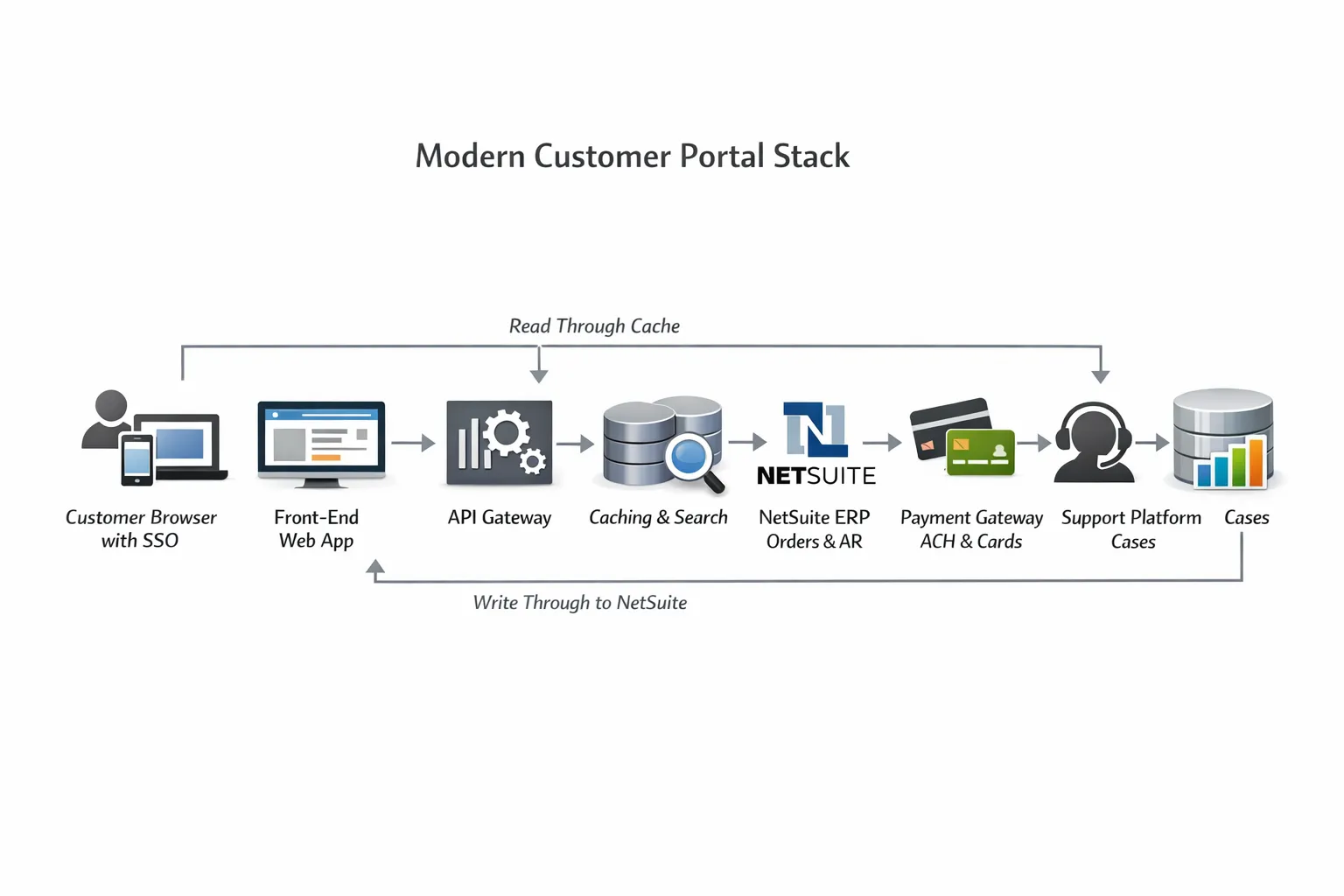
- Add a modern front-end layer that calls NetSuite through REST integrations, so you keep ERP truth but deliver a faster, branded experience.
- If you are on SuiteCommerce, consider the My Account experience and extensions, which many teams use to modernize the look and feel.
- Instrument product analytics to find drop-offs, then simplify navigation to the top three jobs customers do: view and pay invoices, track orders, request returns.
2) AR self-service and payments
Limitation: Customers often need features beyond view and pay, like partial payments, ACH and card wallets, autopay for recurring invoices, remittance uploads, credit memo application, and statements by subsidiary. These needs usually exceed the default flows.
Mid-market fixes:
- Integrate a payment gateway for ACH and cards with tokenization, then post Customer Deposits or Customer Payments back to NetSuite and auto-apply to open AR.
- Offer Payment Links on invoices and a consolidated Statements page. Use saved searches to build aging views customers understand.
- Add dunning and reminders, then track DSO before and after. We often see measurable reduction when customers can self-resolve issues.

3) Account hierarchies and user roles
Limitation: Many customers have a parent buying group with locations and multiple contacts who need different rights. Delegated admin, the ability for a customer user to invite colleagues and assign roles, is limited in the default experience.
Mid-market fixes:
- Model a customer account hierarchy in NetSuite using standard customer and subcustomer relationships or a simple custom record for sites and departments.
- Build a Delegated Admin page in the portal so a customer admin can invite users, reset access, and assign roles like Billing, Purchasing, or Read-only. Sync these back to NetSuite contacts.
- Enforce data isolation by subsidiary, class, or location through saved searches and REST endpoints that filter server-side.
4) Returns, RMAs, and warranties
Limitation: Out of the box, customers cannot easily create RMAs with reason codes, photos, or pickup options. Warehouse workflows and status visibility are limited.
Mid-market fixes:
- Expose a Return Authorization request page that creates the proper NetSuite Return Authorization record, including item-level reasons and quantities.
- Allow file uploads to secure storage, then link files to the RMA record. Show status changes back to the customer without giving raw backend access.
- If you use a WMS, integrate RMA receipts and disposition codes so customers see closure faster.
5) Subscriptions and contract changes
Limitation: Self-service subscription changes are limited without extending the model. Customers want to update quantities, billing cycles, contacts, and payment methods.
Mid-market fixes:
- If you use NetSuite subscription billing, expose a simple Manage Subscription page that writes safe changes through your approved workflow.
- If subscriptions live in an external system, surface that system through the portal while keeping NetSuite the financial source of truth.
6) Support cases and knowledge base
Limitation: The default case UI is basic and the knowledge base is not optimized for deflection.
Mid-market fixes:
- Use a dedicated support platform for advanced features, then sync key fields bi-directionally with NetSuite so finance and operations keep full context.
- Add guided forms that capture the right details at submission, which reduces back-and-forth and improves first contact resolution.
- Layer a search assistant that surfaces policies, order status, and entitlement rules from your data, which prevents unnecessary tickets.
7) OneWorld, multi-currency, and tax complexity
Limitation: Customers with global footprints need subsidiary-aware visibility, local currency statements, and tax documentation. The default experience can be confusing when data spans multiple entities.
Mid-market fixes:
- Drive all views from saved searches that filter by customer, subsidiary, and role. Present local and base currency side by side so totals reconcile.
- Provide downloadable statements and tax documents by subsidiary. Clarify remit-to details to reduce misdirected payments.
8) Identity, SSO, and security controls
Limitation: Many teams want single sign-on with an external identity provider for customers, fine-grained session controls, and easier password recovery. Options in the legacy experience can be limiting.
Mid-market fixes:
- Place an identity provider in front of the portal for SSO, with social or enterprise login if your customers require it. Keep NetSuite isolated behind secure APIs.
- Use short-lived tokens, IP-based rules where appropriate, and role-based authorization on every API call. Centralize audit logs for compliance.
9) Performance, search, and scale
Limitation: Large saved searches and portal pages can be slow at high volumes, which drives abandonment.
Mid-market fixes:
- Cache read-heavy data in a search index or a lightweight read store, then refresh incrementally as orders and invoices change. Keep writes transacting in NetSuite.
- Pre-compute common queries like open AR, recent orders, and shipment tracking, then serve instantly from the cache.
10) Reporting and ROI visibility
Limitation: It is hard to prove the portal saves money without clear telemetry. Native usage reporting is limited.
Mid-market fixes:
- Track adoption and outcomes: percentage of invoices paid through the portal, time to pay from invoice issue, case deflection rate, RMA cycle time.
- Tie portal events to financial metrics. CFOs care about DSO, write-offs avoided, cost per case, and cash forecasting accuracy. For more on the math, see our managed service ROI guide for CFOs.
Four upgrade paths, compared
| Approach | Time to value | Branding and UX | SSO options | AR and payments | Cost drivers | Best fit |
|---|---|---|---|---|---|---|
| Keep native Customer Center, add Suitelets and saved searches | Fastest | Basic, light theming | Limited without an external layer | View and pay basics, extensions required for wallets and autopay | Low to moderate, internal admin and scripting | Early stage portal or small customer base |
| SuiteCommerce My Account and extensions | Moderate | Modern templates and extensions | Can align with broader commerce SSO strategy | Strong basics, payment integrations available | SuiteCommerce license plus extension development | Organizations already on SuiteCommerce with ecommerce goals |
| Headless portal with API integration | Moderate to longer | Full control, any design system | Any identity provider | Full flexibility, any payment gateway | Front-end development plus API integration | Teams with strong dev resources or specific UX requirements |
| Integrated support and AR portal platform | Moderate | Pre-built, configurable | Enterprise SSO ready | Built-in payment processing and AR automation | Platform subscription plus implementation | Mid-market teams wanting turnkey solution with NetSuite sync |
Note: Feature depth and licensing vary by NetSuite edition and your account configuration. Confirm specifics with your Oracle NetSuite account team before committing to an approach.
Implementation blueprint for mid-market teams
1) Baseline and business case
- Gather adoption data: percent of customers who log in monthly, AR paid via portal, top support reasons. Interview 10 customers to identify the three jobs that matter most.
- Quantify the opportunity with finance. Target outcomes like fewer calls per order, faster payment, and lower cost per case. Our piece on IT services that scale with your ERP covers how to align this with your ERP roadmap.
2) Choose the path
- Decide whether to extend native, move to SuiteCommerce My Account, build a headless layer, or integrate a support portal. Pick the smallest change that unlocks your next 18 months.
3) Identity and data architecture
- Select your identity provider and session model. Map data flows and security controls. Define which objects read from cache and which write directly to NetSuite.
4) Quick wins backlog
- Examples that typically fit in an early sprint: consolidated invoice view with Pay All, downloadable statements, shipment tracking links, guided RMA form, and a basic knowledge search.
5) MVP and pilot
- Launch to one region or a handful of key accounts. Instrument everything so you can prove value and fix friction before scale.
6) Rollout and iterate
- Add delegated admin, autopay, subscription changes, and deeper analytics in subsequent releases. Share wins with leadership—for example, lower DSO and fewer inbound calls. If you run a partner-led operating model, see why a partner-first strategy can win.
KPI framework to prove the fix worked
| KPI | Why it matters | How to measure |
|---|---|---|
| Portal adoption rate | More users in the portal means fewer calls and emails | Monthly active customer users divided by total active customers |
| AR self-service rate | Direct impact on cash flow and DSO | Count of invoices paid through the portal divided by total invoices paid |
| Average time to pay | Faster cash, better cash forecasting | Difference between invoice date and payment date, trended |
| Case deflection rate | Lower support costs and faster resolution | Cases avoided through self-service divided by total potential cases |
| RMA cycle time | Customer satisfaction and inventory velocity | Time from RMA request to resolution |
| Cost per customer contact | Efficiency of support operations | Total support costs divided by number of contacts |
For CFOs and COOs, map each win to a financial lever: labor hours avoided, write-offs reduced, carrying cost of AR, and lower cost per contact. For a broader managed partner view, see what a managed partner brings to mid-market teams.
How to get started
If your NetSuite customer portal is holding back adoption and cash collection, the path forward is clear: baseline your current state, choose the right upgrade path for your scale, and execute with a focus on measurable outcomes.
Ready to modernize your NetSuite customer experience? Schedule a discovery call to discuss how we can help you close the gaps and drive real ROI from your customer portal investment.
DataOngoing Team
Technology Consulting Experts
DataOngoing helps mid-market companies achieve measurable ROI through AI automation, ERP expertise, and digital transformation.