
Self-service is one of the fastest ways to increase NetSuite ROI because it removes human “touches” from high-volume workflows: fewer emails, fewer status checks, fewer manual updates, fewer exceptions that turn into fire drills.
But teams often start in the wrong place. They build a portal, add a few forms, and then realize the core problem was upstream: unclear ownership, missing data contracts, weak approvals, and too many edge-case paths.
This guide focuses on maximizing NetSuite ROI with self-service by answering one practical question: what should you automate first to get measurable impact quickly, without creating a long-term maintenance burden?
What “self-service” means in a NetSuite environment
In mid-market NetSuite orgs, self-service typically shows up in three places:
- Customer self-service: invoices, payments, order status, returns, account updates, support requests.
- Vendor self-service: PO acknowledgements, shipment notices, invoice submission, vendor master changes.
- Employee self-service: purchasing intake, approvals, request tracking, exception handling, standardized submissions.
The best self-service initiatives share one trait: they connect a clean front-end experience to NetSuite (and other systems) as the system of record, with controls that keep data trustworthy.
The prioritization rule: automate “high-volume, low-variance, record-linked” first
If you only remember one thing, make it this: your first automations should target workflows that are frequent, predictable, and tightly tied to NetSuite records.
Those are the candidates that:
- create immediate time savings,
- reduce error rates,
- shorten cycle times (often directly improving cash), and
- are easiest to govern with role-based access and audit trails.
To make this concrete, use a scoring model that balances value and feasibility.
A simple scoring model for self-service ROI
Score each candidate workflow from 1 to 5.
| Factor | What to ask | Why it matters for ROI |
|---|---|---|
| Volume | How many requests, transactions, or tickets per month? | High volume multiplies savings. |
| Time per touch | How long does each request take today (including back-and-forth)? | Time saved is your cleanest ROI lever. |
| Variance | Are steps mostly consistent, or full of unique exceptions? | Low variance is safer to automate. |
| Record linkage | Is the source of truth already in NetSuite (invoice, sales order, item, vendor, case)? | Record-linked automation is more reliable. |
| Cash impact | Will this speed invoicing, payment, dispute resolution, or fulfillment? | Cash acceleration often outweighs labor savings. |
| Risk & compliance | Does it expose sensitive data or require strict approvals? | High-risk flows need stronger governance (and can slow delivery). |
Pick the top 2 to 4 workflows with the best combined score (high value, low complexity) for your first sprint.
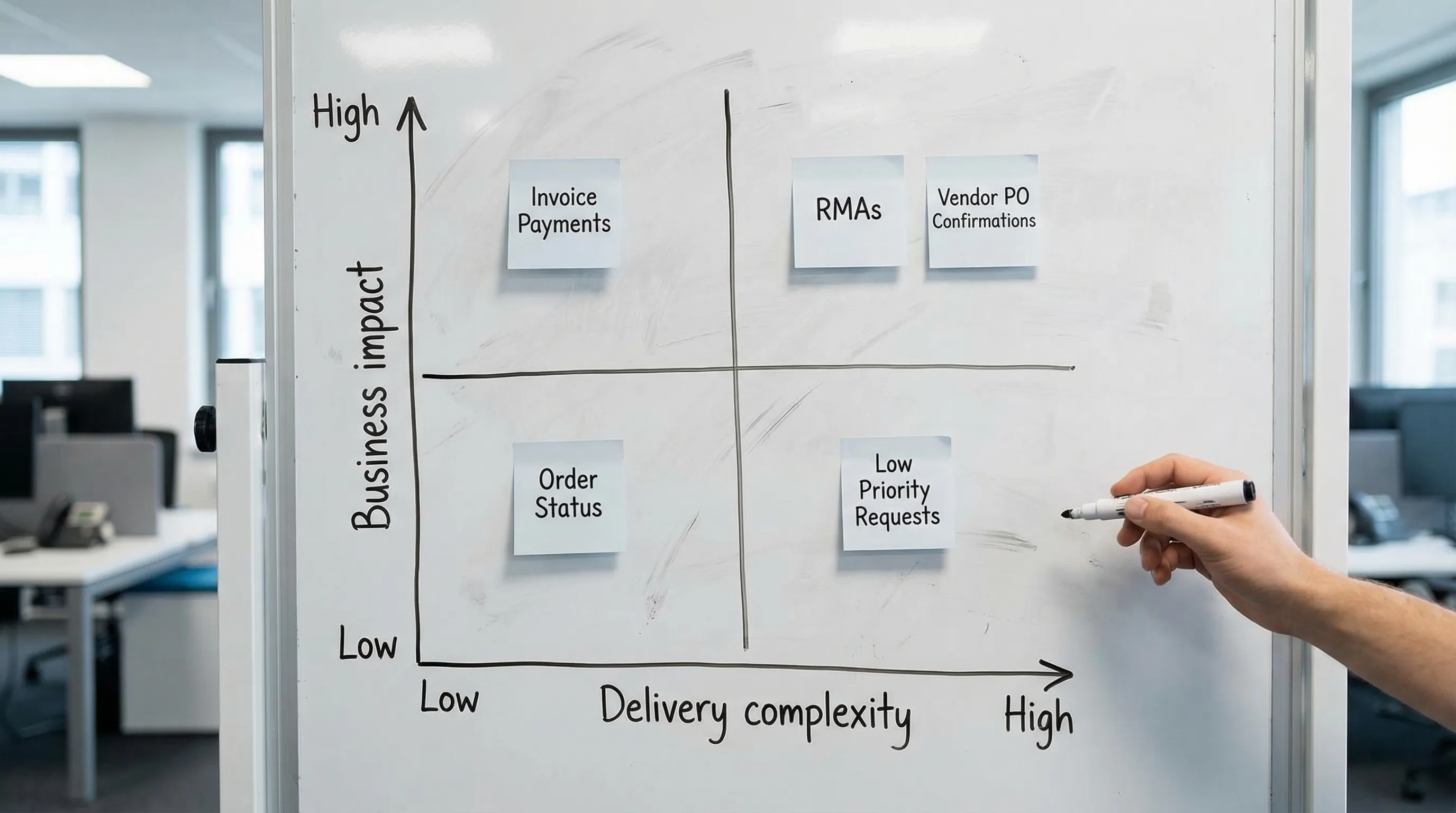
What to automate first (the short list that usually wins)
Below are the self-service automations that most consistently produce early ROI for mid-market NetSuite teams. Your exact order depends on your business model (B2B vs B2C, subscription vs one-time, direct ship vs warehouse), but this is the practical starting set.
1) Invoice, statement, and payment self-service (AR)
If you want a fast ROI story that makes sense to a CFO, start with AR.
High-impact self-service capabilities include:
- Invoice and statement access (by customer hierarchy where relevant)
- Payment links and payment status visibility
- Simple dispute initiation (structured reason codes, attachments, and routing)
- Proof of delivery or fulfillment references where they reduce “why was I billed?” friction
Why this tends to be a first win:
- It reduces repetitive requests to finance.
- It can shorten time-to-pay by removing delays caused by missing documents or unclear balances.
- It often requires less custom logic than operational workflows, as long as access boundaries are well-designed.
Automation goal: reduce “send me an invoice / what do I owe?” tickets to near-zero and make “pay now” the default path.
2) Order status and shipment tracking (customer-facing)
Order status requests are classic high-volume noise. The ROI comes from deflecting tickets and improving the customer experience at the same time.
Start with the simplest experience that answers the real question: “Where is my order, and when will it arrive?”
Common building blocks:
- Sales order status and shipment status visibility
- Carrier tracking links (often via your shipping stack or 3PL integration)
- Clear exception states (backorder, partial ship, address hold, credit hold) with a guided next step
Automation goal: customers stop emailing “any update?” because your system answers it faster and more accurately.
3) Returns and RMAs (guided intake + policy enforcement)
Returns become expensive when they are unstructured. If your team spends time translating free-form emails into eligible RMAs, you have an automation opportunity.
A good first RMA automation focuses on:
- Eligibility checks (time window, item condition rules, subscription terms)
- Structured intake (reason codes, photos, quantities, lot or serial where needed)
- Automatic routing (refund vs replacement vs repair)
This is also a place where self-service improves data quality, because reason codes and item-level return data become reportable.
Automation goal: reduce cycle time and prevent “return chaos” from polluting inventory, finance, and customer satisfaction.
4) Case intake and triage (especially when NetSuite is the context source)
Even if your customer support platform is not NetSuite, NetSuite is often the best source of truth for order, fulfillment, invoice, and entitlement context.
High-leverage automation patterns:
- Structured case intake forms that attach the right records up front
- Automatic categorization and routing based on customer tier, product line, status, or revenue impact
- Suggested next actions that reference real ERP data (recent orders, open RMAs, unpaid invoices)
If you are exploring AI here, keep the first scope narrow: triage and drafting, not autonomous decision-making.
Automation goal: fewer tickets that require humans to “go find context,” and faster time-to-resolution.
5) Vendor PO acknowledgements and exception handling
Procurement teams lose hours chasing confirmations, revised ship dates, substitutions, and partial availability.
Self-service for vendors can start with a single, high-ROI interaction:
- Vendor confirms PO lines, quantities, and expected ship dates
- Vendor flags exceptions with a structured reason
- NetSuite updates drive alerts and downstream replanning
This is one of the best “automation first” candidates because it reduces both labor and operational risk (late shipments that no one sees until it is too late).
Automation goal: confirmations become the default, exceptions become visible immediately, and buyers stop living in inboxes.
6) Master data changes with guardrails (customer and vendor updates)
Mid-market teams often hesitate to self-serve master data because it can break downstream processes. That hesitation is valid.
Still, there is ROI if you do it with controls:
- Customer ship-to updates with approval workflows
- Tax or exemption document collection with validation and routing
- Vendor banking or remit-to changes with strong verification steps
This is also where governance matters most. If you are operating in regulated environments, or handling sensitive personal and financial information, get your privacy and compliance approach reviewed early. Automation goal: reduce manual updates while increasing auditability, not decreasing it.
A practical “automate first” roadmap (30, 60, 90 days)
You do not need a year-long portal program to get results. You need a tight loop: pick one workflow, ship an MVP, measure, and iterate.
| Timeframe | Outcome | What you build |
|---|---|---|
| 0 to 30 days | Clear targets and baselines | Top request types, current cycle times, current volumes, and a prioritized automation backlog |
| 31 to 60 days | First production self-service workflow | One workflow end-to-end (front-end, NetSuite integration, approvals, audit trail, monitoring) |
| 61 to 90 days | Repeatable delivery system | Second workflow shipped, shared components reused (identity, permissions, logging, analytics), KPI dashboarding |
The difference between a “portal that exists” and self-service that drives ROI is instrumentation. Define success metrics before you build.
The KPIs that prove NetSuite self-service ROI
Match KPIs to the workflow you picked, and keep them defensible.
| Workflow | KPIs that usually matter | What improves ROI |
|---|---|---|
| AR self-service | % invoices self-served, time-to-pay, dispute cycle time, AR touches per invoice | Fewer requests, faster cash, fewer write-offs from delayed disputes |
| Order status | Ticket deflection rate, repeat-contact rate, time-to-ship exceptions surfaced | Lower support load, higher retention, fewer expediting costs |
| Returns/RMA | RMA cycle time, return reason completeness, inventory disposition speed | Lower handling cost, fewer errors, better product feedback loops |
| Case intake | First response time, time-to-resolution, % cases with correct record linkage | Less rework, faster resolution, fewer escalations |
| Vendor confirmations | % POs acknowledged, lead-time variance visibility, exception response time | Better planning, fewer stockouts, fewer emergency buys |
Common mistakes that kill ROI (and how to avoid them)
Most self-service failures are not technology failures. They are design failures.
- Starting with UI instead of workflows: if the underlying process is unclear, you are just building a nicer way to create chaos.
- Automating edge cases first: exceptions are important, but they are rarely the best first automation.
- Weak access boundaries: especially with parent-child accounts, delegated admin, and multi-entity setups.
- No monitoring: integrations fail, scripts time out, and token permissions change. If you cannot see it, you cannot trust it.
- Over-customizing NetSuite prematurely: configuration-first and reusable components reduce long-term cost.
If you want a deeper look at building portals responsibly, DataOngoing’s guide on NetSuite self service portal setup complements this “what to automate first” lens.
Choosing the right self-service implementation approach (quick guidance)
You can get early ROI with multiple approaches, as long as you keep NetSuite as the system of record and treat identity, permissions, and integrations as first-class concerns.
- If you need basic account visibility and simple actions, native role-based Centers can be enough.
- If you need a customer-grade experience, guided workflows, or to expose data across systems, you typically need a portal layer and integrations.
- If you need to move quickly without building an in-house team, a managed partner model can reduce both delivery time and operational risk.
For a buyer-oriented view of what good delivery looks like in 2026, see Choosing a NetSuite partner: 2026 guide.
Where DataOngoing fits (when you want ROI, not just features)
Self-service ROI comes from sustained execution across operations, marketing, and technology, not a one-time build. DataOngoing’s managed service approach is designed for mid-market teams that want measurable outcomes from NetSuite, AI automation, and system integrations without rebuilding an internal delivery org.
If you are deciding what to automate first, and you want a clear ROI plan with delivery sequencing, measurement, and governance, start with a short discovery scoped around your top two workflows. You can also reference DataOngoing’s perspective on building ROI cases in Managed service ROI: a practical guide for CFOs.

DataOngoing Team
AI-First Managed Service Provider
DataOngoing helps mid-market companies achieve measurable ROI through AI automation, ERP expertise, and digital transformation.