
Most mid-market teams do not have a "phone problem." They have a context problem.
Customers call and ask questions you already have answers to in NetSuite (order status, invoice balance, RMA eligibility, item availability), but the answers are trapped behind logins, screens, and tribal knowledge. That creates avoidable costs, slow response times, and inconsistent service.
AI call agents for NetSuite solve that by turning NetSuite into a real-time source of truth that a voice agent can safely read from (and in limited cases, write back to) with guardrails and auditability. Done well, they reduce call volume to humans, shorten handle time, and improve cash collection, without risking financial controls.
What "AI call agents" means (and what it does not)
An AI call agent is a voice-based assistant that can:
- Understand a caller's intent (for example, "Where is my order?")
- Retrieve the right data from systems of record (NetSuite, WMS, shipping carrier, CRM)
- Follow a scripted, policy-aware workflow (authentication, permissions, next-best action)
- Resolve the request or route to a human with full context
It is not just a phone tree (IVR) and it is not a generic chatbot that guesses. In a NetSuite environment, the highest ROI comes from tool-using, record-linked agents that rely on your ERP data and approved workflows.
If your team is still aligning on safe automation boundaries, DataOngoing's perspective in AI for Work: Automate Without Risk maps well to call automation: automate busywork, keep high-impact exceptions human-led.
Why NetSuite-connected voice agents can outperform typical call automation
Traditional call automation fails for the same reasons many portals fail: callers need answers tied to their account, their orders, their terms, and today's data.
NetSuite is where that context lives:
- Customer records, contacts, and hierarchies
- Sales orders, fulfillments, tracking numbers
- Invoices, credits, statements, payment status
- Cases, RMAs, item availability, pricing rules
When an AI call agent can securely query those objects (and respect role permissions), it can handle a large share of "where is X?" and "what is my balance?" calls accurately.
If you need a refresher on what NetSuite covers across finance and operations, see What Is NetSuite?.
Reference architecture: AI call agent + NetSuite
A practical, production-friendly pattern looks like this:
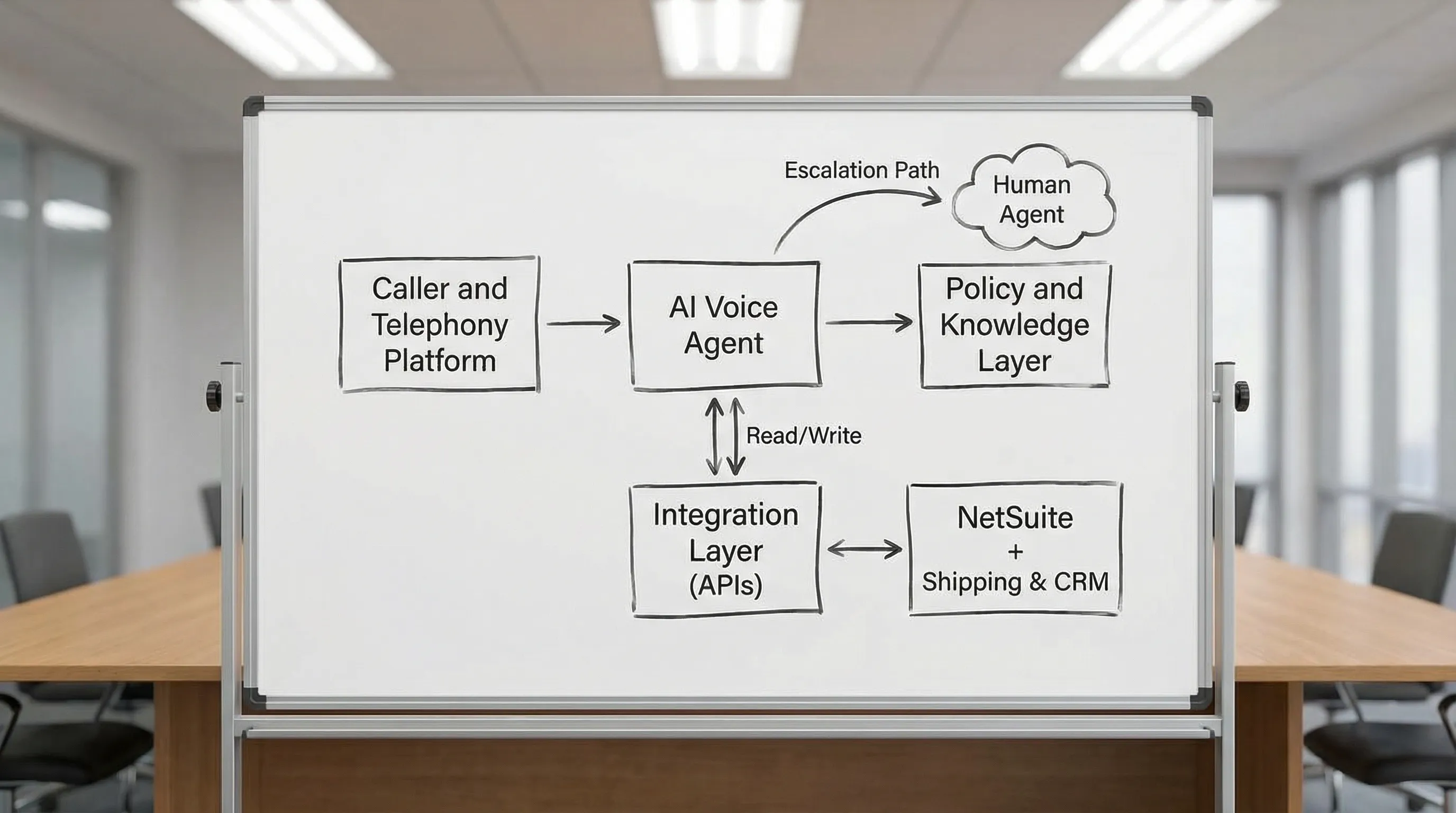
Core components
Telephony layer routes calls, manages numbers, and handles call recording and queueing.
AI agent runtime performs speech-to-text, intent detection, and response generation.
Policy and knowledge layer contains approved scripts, business rules, product policies, and "do not do" boundaries (for example, never collect card data by voice unless you have compliant payment flows).
Integration layer executes tool calls to NetSuite and other systems. In NetSuite this commonly means SuiteTalk APIs and/or SuiteScript endpoints, plus Saved Searches for controlled data retrieval.
Human escalation is not a fallback, it is part of the design. The goal is fast resolution for routine calls and fast handoff for exceptions.
NetSuite-specific design requirements
- Authentication and verification: match phone number to contact when possible, otherwise use a step-up check (for example, invoice number + ZIP, or email OTP)
- Role-based access: the agent should only query what a dedicated "AI Agent" role can see
- Auditability: log the lookup and any write-back (case creation, note added, promise-to-pay) with timestamp and correlation ID
- Data boundaries: minimize exposure of sensitive fields, and use tokenized links for payment and document delivery
One thing worth naming directly: the biggest implementation risk with AI call agents is not hallucination. It is building a call agent on top of NetSuite data that was never clean enough to expose directly to customers. If your order status fields are unreliable when your team reads them on screen, they will be unreliable when an AI reads them over the phone, just faster and at higher volume. The agent amplifies whatever it finds. That means data quality and field discipline in your ERP matter more, not less, when you add AI.
High-ROI use cases for AI call agents in NetSuite
The best use cases share three traits: high volume, clear workflows, and answers that already exist in NetSuite.
1) Order status and shipping updates (Customer Service)
What the agent does: authenticates the caller, finds open sales orders, reads fulfillment and tracking status, answers "when will it arrive," and optionally sends SMS/email tracking links.
NetSuite data involved: Customer, Contact, Sales Order, Item Fulfillment, Ship Method, Status fields.
Why it works: this category can be a large portion of inbound volume and is highly rules-oriented.
2) Invoice status, statements, and "why was I charged?" (Accounts Receivable)
What the agent does: provides invoice balances, due dates, and statement delivery, and routes disputes to a human with the right invoice context.
NetSuite data involved: Customer, Invoice, Terms, Credits/Payments applied, A/R Aging.
ROI lever: fewer "status" calls to A/R staff and faster collections when customers get immediate clarity.
3) Payment nudges and promise-to-pay capture (Collections-lite)
What the agent does: calls customers with past-due invoices, confirms they received the invoice, captures a promise-to-pay date, and creates a NetSuite note or case for follow-up. For actual payments, a secure link is typically safer than taking payment details by voice.
NetSuite data involved: A/R Aging Saved Searches, Invoice, Customer communications log.
Guardrail: treat the agent as an assistant, not a debt collector. Keep compliant scripts and ensure easy opt-out.
4) Returns and RMAs (Support + Ops)
What the agent does: checks order eligibility, provides return instructions, creates or updates a case, and schedules a call-back for edge cases.
NetSuite data involved: Sales Order history, Item/Serial/Lot (if applicable), Return Authorization (RMA) workflow, Cases.
ROI lever: reduces time spent on policy explanation and basic eligibility checks.
5) Case intake and triage (Support desk)
What the agent does: captures the issue, validates entitlement (if you track it), collects structured details, creates a NetSuite case, and routes to the right queue.
NetSuite data involved: Customer, Cases, custom records (products, contracts), SLA fields (if you use them).
This complements the layered approach described in B2B Customer Support That Works, especially when the phone channel is where your "highest friction" issues arrive.
6) Sales follow-up and appointment setting (Revenue ops)
What the agent does: handles inbound calls from campaigns, qualifies basic fit, books time, and logs disposition back to CRM/NetSuite.
NetSuite data involved: Leads/Prospects (if used), activity logging, campaign attribution (varies by setup).
Note: this can work well, but quality depends on your lead routing rules and sales process clarity.
Use case selection matrix (what to prioritize first)
Start with the calls that are easiest to answer accurately from NetSuite and that currently consume the most human minutes.
| Use case | NetSuite is source of truth? | Typical risk level | Automation goal | Best first KPI |
|---|---|---|---|---|
| Order status / tracking | High | Low | Resolve without human | Containment rate |
| Invoice status / statement delivery | High | Medium | Resolve and deliver docs | Calls per A/R rep |
| RMA eligibility / instructions | Medium | Medium | Triage + case creation | Average handle time |
| Case intake and routing | Medium | Low | Structured intake | After-call work minutes |
| Collections promise-to-pay | High | Medium | Capture commitments | Promise-to-pay capture rate |
| Sales qualification | Medium | Medium | Book meetings | Qualified meetings per week |
How to quantify ROI (a practical model you can take to finance)
AI call agent ROI is usually not a single number. It is a portfolio of savings and performance gains.
The three biggest benefit buckets
1) Call containment (deflection): fewer calls handled by humans.
2) Handle time reduction: shorter calls because the agent pulls NetSuite context instantly and does not put callers on hold.
3) After-call work reduction: less manual logging, fewer case notes, fewer internal pings, because the agent writes structured summaries into the record.
Simple ROI formula for a first-pass business case
You can model annual benefit like this:
Annual savings from containment = (Automated calls per month) x (Cost per human-handled call) x 12
Annual savings from faster handling = (Human-handled calls per month) x (Minutes saved per call) x (Fully loaded cost per minute) x 12
Annual savings from reduced after-call work = (Cases per month) x (Minutes saved per case) x (Fully loaded cost per minute) x 12
Then compare against total program cost:
Total annual program cost = (Platform/license fees per month x 12) + (Integration build, one-time, amortized over expected life) + (Ongoing tuning and monitoring per month x 12)
Net annual value = Total savings minus Total program cost. A positive number in year one is strong. If the payback extends into year two, make sure the trajectory is clear and the non-financial benefits (faster response, better customer experience, reduced team burnout) are documented.
If you want a CFO-friendly way to baseline, risk-adjust, and verify returns over time, the measurement cadence in Managed Service ROI: A Guide for CFOs is a good template.
What to measure in the first 30 to 90 days
| Metric | What "good" looks like | Why it matters |
|---|---|---|
| Containment rate | Trending up over time | Shows the agent is learning and workflows are improving |
| Escalation quality | Fewer re-asks by humans | Prevents hidden cost transfer to your team |
| Average handle time (AHT) | Down for calls still handled by humans | Indicates NetSuite context is being used well |
| First contact resolution (FCR) | Up | A direct driver of customer effort and satisfaction |
| Error rate / incorrect answers | Near zero on financial facts | Protects trust and reduces rework |
| Call reason mix | More "complex" handled by humans | Confirms you are shifting workload, not just adding a layer |
Implementation approach: productionize, do not "pilot purgatory"
A reliable rollout is usually less about the model and more about workflow clarity and systems integration quality.
Phase 1: Pick the workflow and define guardrails
Choose one or two call types (order status, invoice status) and define:
- The exact NetSuite fields and searches the agent can use
- Allowed actions (read-only first is common)
- Verification steps before revealing account-specific information
- Escalation triggers (angry sentiment, policy exception, missing record, high-value customer)
Phase 2: Build the NetSuite integration surface
The integration should be designed for stability:
- Use controlled Saved Searches and purpose-built endpoints rather than letting an agent query freely
- Return structured results (status, dates, amounts) so responses are grounded
- Log every tool call so issues are debuggable
Phase 3: Ship with instrumentation and continuous tuning
Treat the agent like a product:
- Review call transcripts for failure modes
- Track containment by intent category
- Update policies and scripts as your business changes
This fits naturally with a managed services model. If you are comparing delivery approaches, NetSuite Managed Services: Pricing and ROI lays out how ongoing optimization tends to outperform one-off projects for systems that evolve.
Risks and controls (what to get right before you scale)
AI call agents touch customer trust and financial data, so controls matter.
Key risks
Hallucinated answers: avoid open-ended "guessing." Use record-linked lookups and deterministic workflows.
Data leakage: do not reveal invoice balances or order details without verification.
Bad write-backs: only allow updates that are safe and reversible (case creation, notes, disposition tags) until you have mature governance.
Compliance issues: be cautious with payment data and call recording rules that vary by jurisdiction.
Practical controls to implement
- Read-only mode for initial launch, then add safe write-backs
- Tool-call allowlists (only specific NetSuite searches/actions)
- Human-in-the-loop for disputes, credits, contract terms, and exceptions
- Security review aligned with common frameworks like the NIST AI Risk Management Framework
Where DataOngoing fits
DataOngoing helps mid-market teams operationalize AI automation inside real business systems, especially NetSuite, with a managed service approach focused on measurable ROI. That matters for call agents because the work is never "done" at go-live. Processes change, item catalogs change, payment flows change, and the agent has to keep up.
If your phone workflows rely on multiple systems (NetSuite + e-commerce + shipping + support tooling), DataOngoing's integration-first approach to AI corporate solutions is covered in AI Corporate Solutions for the Mid-Market.
Frequently Asked Questions
Do AI call agents replace my support or A/R team? They usually reduce routine workload and queue pressure first. The biggest wins come from shifting humans to exceptions, disputes, and relationship-driven conversations.
Can an AI call agent update NetSuite records? Yes, but it should start with safe write-backs (create a case, add a note, log disposition). More sensitive actions should come later with approvals and strong audit trails.
How do we know if our NetSuite data is ready for a call agent? Start by auditing the specific fields the agent would read: order status, fulfillment status, tracking numbers, invoice balances. If your team regularly has to "look past" stale or incomplete data in those fields today, the agent will surface those same gaps to customers. A short data readiness review before you build saves weeks of debugging after launch.
How do you prevent incorrect answers? Use a tool-using design where the agent must retrieve specific fields from NetSuite, then respond from those facts. Add verification steps and escalation rules for anything ambiguous.
Is this only for customer support? No. Mid-market teams often see strong ROI in A/R (invoice status and statement delivery) and operations (returns and case intake), because those calls are repetitive and NetSuite-backed.
How long until we see ROI? For high-volume, low-risk workflows like order status, teams often see measurable impact once the agent is live and tuned for a few iteration cycles. The exact timeline depends on call volume, integration scope, and how cleanly your NetSuite data supports the workflow.
Build a NetSuite-connected call agent that pays for itself
If you want to evaluate AI call agents for NetSuite with a clear business case, start here: ask your team to count how many inbound calls last week were just "where is my order?" or "what is my balance?" That number is your starting line. Then pick one of those workflows, define the KPIs, and build an integration surface you can trust.
DataOngoing can help you design the workflow, integrate it safely with NetSuite, and run it as an improving managed capability.
Explore DataOngoing's approach to AI automation or schedule a conversation to map use cases, controls, and ROI.
DataOngoing Team
Technology Consulting Experts
DataOngoing helps mid-market companies achieve measurable ROI through AI automation, ERP expertise, and digital transformation.