
AI hype promises everything, but the winners in 2026 will be doing something simpler and far more effective. They use AI to clear the path for people, not replace them. The goal is straightforward: automate the busywork that slows your teams, and protect the strategic thinking that differentiates your business.
AI for work should feel like a quiet force multiplier. It removes manual steps, cleans up data, drafts the first version, and flags exceptions, so your experts can decide, negotiate, design, and lead.
Most AI initiatives fail not because the models are weak, but because companies automate decisions before they automate discipline. Without stable systems, clear ownership, and defined approval paths, AI doesn't accelerate value — it accelerates inconsistency.
Here is how mid-market operators can put that into practice with confidence, governance, and measurable ROI.
Busywork vs. Strategy: A Practical Distinction for AI at Work
Busywork is high-volume, low-variance, rules-informed activity that consumes calendar time and attention. Strategy is ambiguous, high-impact, and judgment-heavy. Most AI failures happen when organizations blur this line.
Where teams get into trouble is not misunderstanding the definition — it's mislabeling work to justify automation.
Tasks are often called "busywork" simply because they are time-consuming, uncomfortable, or politically hard to own. That doesn't make them safe to automate.
True busywork has objective success criteria, a repeatable process, and outcomes that can be verified in system logs. It benefits from automation with a human review step.
Strategy, by contrast, involves tradeoffs, second-order effects, and context that is rarely captured cleanly in data. Automating it doesn't eliminate risk — it obscures it.
False positives: work that *looks* automatable but isn't
Some of the most expensive AI mistakes come from automating tasks that appear rules-based on the surface but are strategically loaded underneath.
- Pricing and discount logic — Pricing models look automatable — until margin erosion shows up months later and no one can trace why. Pricing decisions encode strategy, positioning, and risk tolerance. They require experienced judgment and clear accountability.
- Contract language and negotiations — Templates can assist, but final language reflects commercial intent, legal exposure, and long-term relationships. These are not batch decisions.
- Customer-facing auto-responses — Auto-responders without context destroy trust in B2B support. Speed without relevance signals indifference, not efficiency.
- Performance narratives and executive reporting — Summarization helps, but interpretation is strategy. The story behind the numbers is where leadership value lives.
A practical litmus test
Before automating any workflow, ask:
> If this task is done incorrectly, will we notice immediately — and can we reverse it safely?
If the answer is no, it is not busywork. It needs stronger process discipline, clearer ownership, or human judgment before AI should touch it.
This distinction is what separates AI that quietly compounds value from AI that creates downstream risk.
A quick triage framework to find high-ROI automations using AI
Use the 4Rs to prioritize work for AI assistants and automation.
- Repetitive — the workflow happens daily or weekly.
- Rules-oriented — decisions follow policy, not personal preference.
- Record-linked — the output updates a system of record like ERP or CRM.
- Risk-bounded — errors are reversible or catchable with review.
| Work type | Signal it is busywork | How AI helps | Human check |
|---|---|---|---|
| AP invoice intake | Staff key vendors, GL codes by hand | Extract fields, suggest codes, route for approval | Approver verifies posting |
| Reconciliation | Time spent matching IDs, line items | Auto-match, explain exceptions | Finance signs off on exceptions |
| Status reporting | Manual copy and paste from systems | Summarize metrics, add context, link to sources | Manager reviews narrative |
| Support triage | High first-response times | Classify intent, suggest answers from KB | Agent confirms before sending |
| Lead enrichment | SDRs search company data manually | Enrich from CRM, ERP, and public data | Rep reviews before outreach |
| Content first drafts | Blank-page time for emails, briefs | Draft on-brand templates with variables | Owner edits and approves |
Where AI fits in your work stack
Think in layers so automation stays reliable as you scale:
- Systems of record — ERP, CRM, HCM, data warehouse. Keep them the single source of truth.
- Systems of engagement — web, chat, email, forms, and ticketing.
- Systems of intelligence — AI assistants and automation that read from, reason over, and write back to records with guardrails.
For mid-market teams running NetSuite and a modern go-to-market stack, the best results come from event-driven integrations and retrieval augmented generation (RAG) that bring enterprise context to the model without exposing sensitive data.
If your ERP program needs stabilization before you automate around it, start there. A healthy system of record is the foundation for credible AI. See practical recovery steps in our guide on rescuing a failing NetSuite implementation.
High-impact AI plays by function
Finance and operations
Automate document-heavy flows that map cleanly to policy. Examples include invoice capture and coding, vendor statement reconciliation, purchase order matching, and month-end status summaries. AI handles extraction and recommendation, your team approves, and your ERP stays the source of truth. This is typically the fastest path to measurable hours saved per month.
Sales
Use AI to enrich leads with firmographic data you already own, summarize call notes to CRM in your style, and draft compliant follow-ups. Avoid automating pricing or contract language. Those remain strategic, and they carry risk that is best managed by experienced sellers.
Marketing
AI accelerates briefs, meta descriptions, and channel-specific variants from approved messaging. Keep brand voice locked by using a reference library and require human editorial review before publishing. Use AI for analysis too, like clustering search queries and summarizing performance insights.
Customer support
Triage, classification, and knowledge base suggestions are ideal. Let AI route tickets, propose answers with citations to your docs, and surface similar resolved cases. Agents stay in control of the final response, which maintains quality while improving response times and consistency.
IT and engineering
Automate ticket summarization, impact analysis from logs, and release-note drafting. Use AI to propose test cases and assist with code scaffolding, then keep code reviews and security gates firmly in human hands. This preserves velocity without compromising reliability.
Guardrails that keep you out of trouble
Practical governance protects brand, customers, and regulators while maintaining speed.
- Data handling — minimize data sent to models, redact PII where possible, and apply least-privilege access. Keep system-of-record updates traceable.
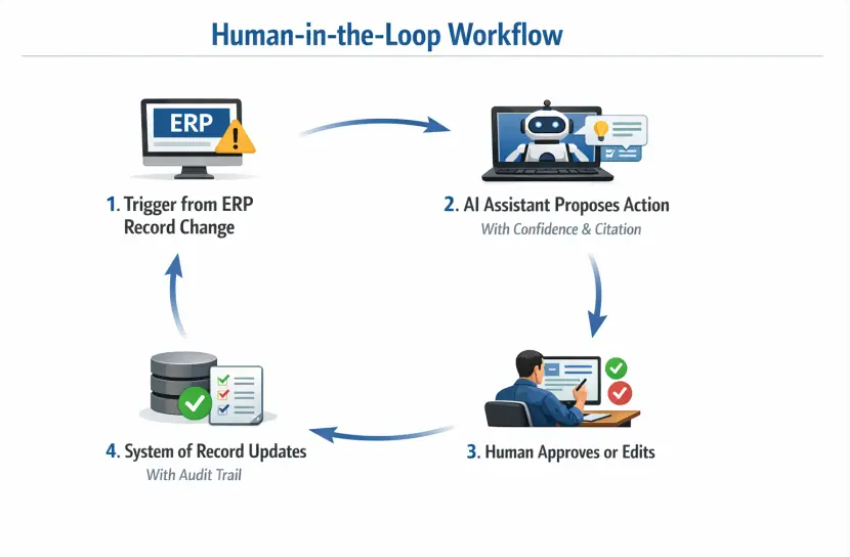
- Human-in-the-loop — require approval for write-backs, handle only low-risk actions autonomously, escalate exceptions.
- Evaluation — use test sets, spot checks, and live feedback to measure accuracy, latency, and user satisfaction. Track regressions when models or prompts change.
- Compliance — align with the NIST AI Risk Management Framework for risk identification, measurement, and controls, and document your decision rights and oversight.
Connecting AI to ERP and the rest of your stack
AI is only useful when it works where the work happens. For NetSuite and other ERPs, tie automations to events like record creation or status change, then run a policy-aware pipeline that proposes the next action, writes back with the approver's ID, and logs the decision. The same pattern works across CRM, support, and web.
A few integration principles for reliability:
- Use webhooks or scheduled jobs for deterministic triggers.
- Keep idempotent operations, safe to retry without duplicates.
- Write metadata about who approved and what the model suggested.
- Centralize secrets and access control, and rotate keys routinely.
We cover broader IT scaling considerations in IT service solutions that scale with your ERP.
Measuring AI ROI without hand-waving
Agree on baselines, then treat AI like any other productivity lever. Start with time saved, error reduction, and throughput, then translate to dollars using fully loaded costs. Include quality and risk in the assessment, not just speed.
| Metric | How to measure | Example calculation |
|---|---|---|
| Time saved | Minutes removed per task times monthly volume | 6 minutes saved times 4,000 invoices equals 400 hours per month |
| Cost impact | Hours saved times fully loaded hourly cost | 400 hours times $65 equals $26,000 per month |
| Accuracy lift | Pre vs. post error rate on a sample | 2.5% errors to 0.8% reduces rework and write-offs |
| Cycle time | Lead time before and after pilot | 5 days to 2 days improves cash or CSAT |
| Control strength | % of actions with approval logs | Target 100% for write-backs |
Pair hard numbers with qualitative wins like less context switching and better morale. For CFO-friendly math on managed services, visit our guide, Managed Service ROI: A Practical Guide for CFOs.
A pragmatic 90-day plan
Phase 1: Prepare (weeks 1 to 3)
- Pick one or two workflows with clear owners and obvious busywork.
- Document current steps, volume, error rates, and systems touched.
- Define approval rules, acceptable risk, and success criteria.
Phase 2: Pilot (weeks 4 to 8)
- Implement an AI assistant that reads from your systems and proposes actions.
- Require human approval for any write-back, and log everything.
- Review results weekly, tune prompts, routing, and exception handling.
Phase 3: Scale (weeks 9 to 12)
- Automate low-risk steps end-to-end, keep human approval for the rest.
- Expand to adjacent workflows that share data and policies.
- Stand up basic governance, evaluation tests, and a change log.
Build in-house or partner up?
Mid-market teams often have the domain expertise but lack integration capacity and ongoing support bandwidth. A managed partner brings repeatable patterns, integration discipline, and continuous optimization, all without expanding headcount. If you prefer predictable spend and enterprise reliability, consider a fixed-monthly engagement that unifies AI automation, ERP integration, and digital operations. Learn what a partner can add in What a Managed Partner Brings to Mid-Market Teams and what to expect from providers in What to Expect from an AI Company in 2026.
Common pitfalls to avoid
- Automating unclear processes — AI amplifies chaos. Stabilize first.
- Letting models write directly to systems without approvals or logs.
- Skipping change management — users need training and feedback loops.
- Ignoring data governance and vendor terms — protect customer and financial data.
- Chasing novelty instead of measurable business value.
Frequently Asked Questions
What should I never automate with AI? Decisions that set strategy, pricing, or policy, legal language, and any irreversible or high-risk action. Keep those with experienced leaders and require multi-party reviews.
How do we keep data safe while using AI? Minimize data sent to models, redact PII, restrict access by role, and log all read and write actions. Prefer architectures that bring the model to your data context rather than exporting sensitive records.
Do we need NetSuite or a specific ERP to benefit? No, but a stable system of record increases AI's reliability. If you run NetSuite, strong workflows and clean data make invoice, PO, and fulfillment automations far more effective.
How quickly should we expect ROI? Many mid-market pilots show meaningful time savings within 30 to 60 days when focused on a single high-volume workflow with clear approval rules. Broader gains follow as you expand to adjacent processes.
How do we reduce hallucinations and errors? Use retrieval augmented generation with citations, constrain prompts, require human approval for updates, and evaluate outputs routinely with test sets and spot checks.
What changes for our teams day to day? Less copying and pasting, fewer context switches, and clearer exception queues. Roles shift toward review, decisions, and higher-value analysis.
Ready to automate the busywork and protect the strategy that sets you apart? DataOngoing helps mid-market companies combine AI assistants, ERP integration, and unified system workflows with fixed monthly pricing and enterprise reliability. If you want measurable ROI and future-proofed systems without adding headcount, schedule a call to start a focused 90-day pilot tailored to your top workflow.
DataOngoing Team
Technology Consulting Experts
DataOngoing helps mid-market companies achieve measurable ROI through AI automation, ERP expertise, and digital transformation.