How mid-market teams can operationalize AI inside NetSuite—safely, measurably, and without turning your ERP into a science project.
In 2025, "AI for ERP" stopped being about chatbots and started being about measurable throughput: fewer touches per transaction, faster closes, fewer exceptions, and cleaner data. For mid-market teams running NetSuite, the real opportunity is not a generic AI layer, it is AI that can read, write, and reason with ERP context while still honoring controls like approvals, segregation of duties, and audit trails.
This guide breaks down the most relevant AI innovations for NetSuite that emerged in 2025 and are now being capitalized on in 2026, what they enable for mid-market operations, and how to implement them safely without turning your ERP into a science project.
What "AI innovations" means in a NetSuite environment
Most mid-market ERP teams do not need novelty. They need repeatable patterns that reduce work, operational friction, and risk. In practice, the AI innovations that matter for NetSuite fall into five buckets:
1) Context-aware assistants (ERP copilots)
These assistants answer questions using NetSuite data and definitions (customers, items, pricing, fulfillment status, invoice aging, custom records). The innovation is not "chat", it is grounding: retrieval (RAG), role-based access, and citations back to the records or saved searches that support an answer.
2) Agentic workflow automation with guardrails
Agents can execute multi-step tasks (create a case, draft a credit memo request, open a vendor claim, compile a month-end packet) by calling tools and APIs.
- Tool calling (structured actions rather than freeform text)
- Human-in-the-loop approvals at the right control points
- Better observability (what the agent did, when, and why)
3) Document understanding that is "ERP-native"
Multimodal models made invoice, PO, and remittance parsing more resilient to messy PDFs and email threads. The key innovation is mapping extracted data to NetSuite semantics (vendors, items, subsidiaries, units of measure, tax codes) with confidence scoring and exception routing.
4) Anomaly detection and forecasting on operational signals
AI moved beyond static dashboards into early-warning systems (duplicate payments, unusual credits, margin drift, demand spikes, integration failures). The best implementations combine statistical checks with AI summarization so teams get both detection and explanation.
5) Integration reliability and "self-healing" operations
For NetSuite-heavy stacks, the hidden ROI is often in preventing silent failures. 2025 brought more practical patterns for:
- Integration error detection and classification
- Auto-triage with suggested fixes
- Runbook-driven remediation (with approvals)
The AI innovations that delivered the most NetSuite ROI in 2026
Below are the patterns that consistently produce ROI for mid-market teams, along with what to watch out for when implementing them.
| AI innovation (2025 pattern) | Where it touches NetSuite | Typical payoff | What can go wrong | Practical control |
|---|---|---|---|---|
| Grounded Q&A (RAG) over ERP data | Saved searches, SuiteAnalytics extracts, custom records | Fewer "where is my order/invoice" touches, faster internal answers | Hallucinated answers, data leakage | Role-based retrieval, record-level permissions, citations to sources |
| Tool-calling agents | SuiteTalk/REST, SuiteScript endpoints, integration middleware | Fewer manual steps for repeatable workflows | Unapproved record changes, SoD violations | Enforce approvals in NetSuite, limited scopes, transaction logs |
| Multimodal document capture | AP inbox, vendor bills, receiving, remittances | Faster AP processing, fewer keying errors | Bad vendor/item mapping, wrong subsidiary/tax | Confidence thresholds, exception queues, 3-way match rules |
| AI-driven exception triage | Order exceptions, backorders, RMAs, disputes | Shorter cycle time on edge cases | "Auto-close" behavior that hides issues | Mandatory reason codes, ticketing audit trail, QA sampling |
| Anomaly detection with narrative | GL, AR/AP, inventory, fulfillment | Earlier detection of leakage and errors | Alert fatigue, false positives | Baselines, tiered alerts, weekly review cadence |
| Integration observability + AI summaries | iPaaS logs, NetSuite integration records | Less downtime, fewer "mystery" failures | Over-automation of fixes | Runbooks, staged remediation, approval for data mutations |
If you want a NetSuite-specific baseline for what "production-grade AI" should look like in a mid-market environment, DataOngoing's overview on AI corporate solutions for the mid-market is a useful companion.
NetSuite use cases where AI innovations compound (not just automate)
Many AI initiatives fail because they target a single step instead of a full workflow. The mid-market wins in 2026 come from choosing workflows where AI can reduce touches across the whole chain.
Finance: close, cash, and controls
High-leverage patterns include:
- Close acceleration: AI that drafts variance explanations, ties narratives to actual reports, and assembles close packages, while finance retains approval.
- Collections enablement: AI that prepares outreach with invoice context, payment history, and promise-to-pay tracking.
- AP exception routing: AI that flags mismatches, recommends coding, and routes to the correct approver.
For voice and phone-heavy workflows, DataOngoing's AI call agents for NetSuite goes deeper on controls and ROI measurement.
Order-to-cash: fewer exceptions, faster fulfillment
NetSuite teams often underestimate how much margin gets burned by:
- Order holds that require manual investigation
- Partial shipments and backorders that drive inbound "status" requests
- Credits and returns that sit in limbo due to missing context
AI innovations help most when they are paired with clear exception categories and "next best action" suggestions, rather than attempting to fully automate judgment.
Procurement and supply chain: cleaner vendor collaboration
Two AI-driven improvements that matter in 2026:
- Supplier confirmation automation: extracting confirmations from email/PDF and pushing structured updates into NetSuite (with validation rules).
- SKU and unit-of-measure normalization support: using AI to suggest mappings, not to silently rewrite item masters.
This is also where system design matters, especially when legacy processes are fragile. DataOngoing's online grocer case study shows what it looks like to rebuild ERP workflows without disruption and regain operational independence from engineering (see case study).
A practical reference architecture: AI that is safe for NetSuite
The fastest way to lose trust in AI is to let it "talk to NetSuite" without a contract. A production pattern for mid-market NetSuite looks like this:
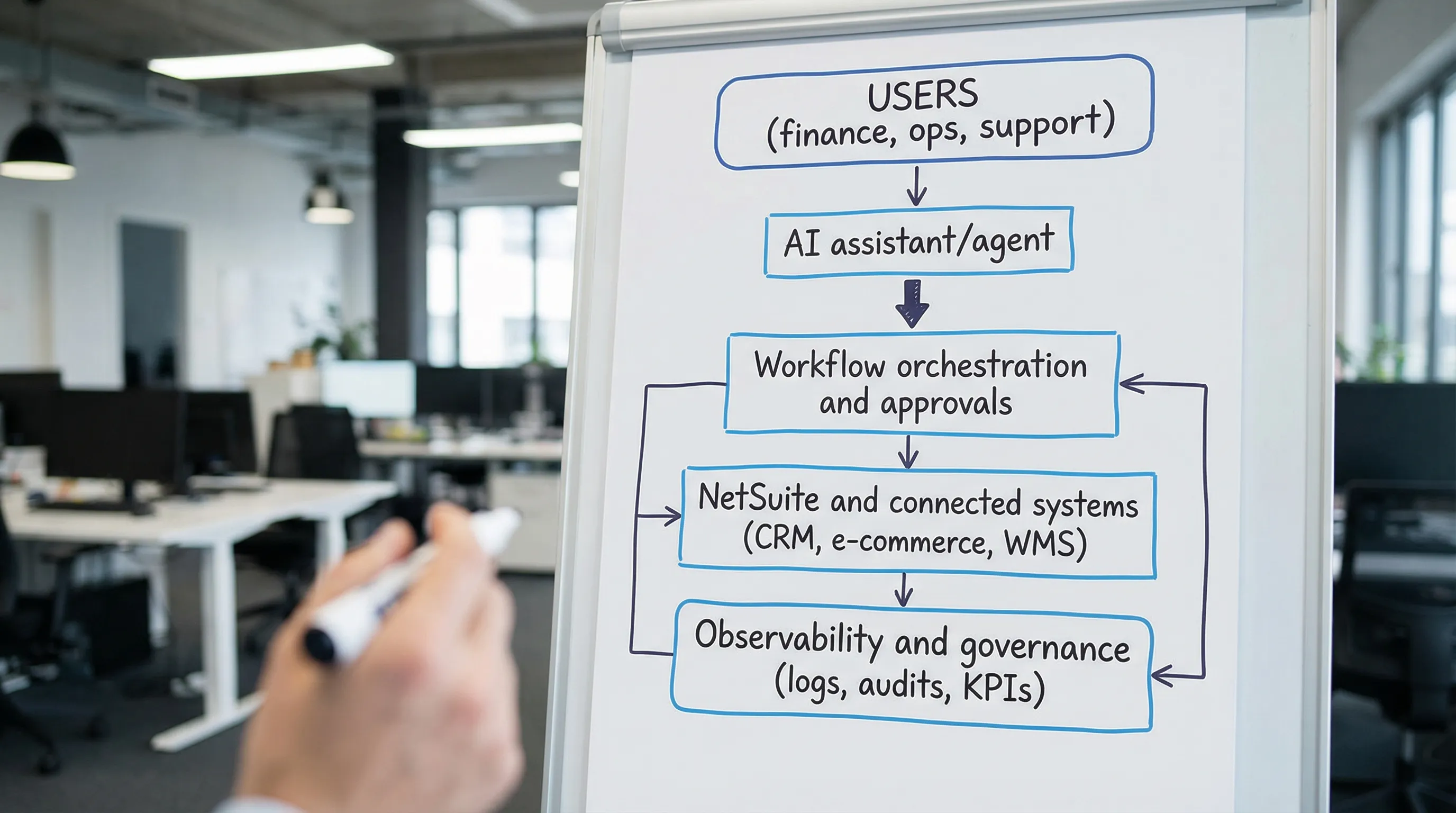
User experience layer (where work happens)
This can be Teams/Slack, a portal, or an internal UI. The key requirement is role awareness: the assistant must respect the same access rules as the employee.
AI layer (models + prompts + retrieval)
In 2026, the "innovation" that reduced risk was treating prompts, tools, and retrieval configurations as versioned assets, similar to code. If you cannot reproduce outputs or audit changes, you cannot operate AI inside finance workflows.
Orchestration layer (the control plane)
This is where your business rules live:
- What data can be read
- What actions can be executed
- When human approval is required
- What gets logged
Systems of record (NetSuite plus your adjacent stack)
NetSuite remains the source of truth for financial and operational records. AI should not bypass NetSuite controls. It should work through them using approved integrations (for example, via SuiteCloud APIs and governed SuiteScript endpoints). Oracle's SuiteCloud developer documentation is the right place to validate supported patterns.
Observability and governance (how you keep it reliable)
You need traces, metrics, and logs that answer:
- What did the AI read?
- What action did it attempt?
- Did NetSuite accept the write?
- Who approved it?
- What was the outcome KPI?
This becomes critical for ongoing tuning in a managed service model.
Guardrails that matter specifically for ERP AI
Mid-market leaders often ask, "How do we move fast without breaking auditability?" In 2026, the teams that will succeed treated guardrails as a product feature, not a compliance tax.
Use NetSuite approvals as the final gate
If an AI agent drafts a vendor bill, journal entry, credit memo request, or customer refund, the final commit should still flow through the appropriate approval workflow.
Enforce least-privilege scopes for tools
Tool calling should be scoped like a service account:
- Read-only scopes for most assistants
- Narrow write scopes for specific automations
- No blanket "admin" access to make prototypes easier
Keep an audit trail outside the model
LLMs are not audit logs. Store structured audit events (inputs, retrieved sources, tool calls, outcomes) in your logging system.
Align risk language to a recognized framework
For US mid-market teams, NIST is a common reference point. Even a lightweight mapping to the NIST AI Risk Management Framework can help security and finance agree on what "safe enough" means.
How to pick the right AI innovation for your NetSuite team (without pilot purgatory)
The best filter is not "coolest model." It is "will this reduce touches in a measurable workflow within a quarter?"
A quick selection rubric
A strong first workflow usually has:
- High volume (daily or weekly)
- Clear definitions (what is correct, what is an exception)
- A measurable KPI (hours saved, cycle time, error rate, DSO, fill rate)
- A bounded risk surface (drafting and recommending before auto-executing)
If you want a structured way to evaluate who should own execution, DataOngoing's Choosing a NetSuite partner: 2026 guide includes a scoring matrix that applies well to AI-enabled work.
A 90-day rollout plan for AI innovations in NetSuite
You do not need a 12-month AI program to get results. You need one workflow, implemented end-to-end, with governance.
Weeks 1 to 2: define the workflow contract
Decide, in writing:
- The job-to-be-done and KPI target
- Data sources that are allowed (NetSuite, CRM, ticketing)
- Actions that are allowed (read, draft, propose, execute)
- Approval points and exception handling
Weeks 3 to 6: build the thin slice
Focus on one narrow, repeatable path. Examples:
- Order status and invoice status responses with citations to NetSuite records
- AP invoice capture that only auto-posts when confidence is high, otherwise routes
- Integration failure triage that generates a ticket with suggested root cause
Weeks 7 to 10: productionize
This is where most pilots die. Treat it as core operations:
- Logging and dashboards
- Role-based access testing
- QA sampling for accuracy
- Documented runbooks and ownership
Weeks 11 to 13: scale to adjacent workflows
Only after you can prove the KPI move, extend the pattern to the next workflow that shares the same data and controls.
For CFO-facing ROI measurement, DataOngoing's Managed Service ROI guide provides a practical model for forecasting and verifying impact.
Frequently Asked Questions
What are the most important AI innovations for NetSuite teams in 2026? The highest-impact innovations were grounded assistants (RAG with permissions), tool-calling agents with approvals, multimodal document extraction, anomaly detection with narratives, and integration observability with AI triage.
Is it safe to let an AI agent write data into NetSuite? It can be, if writes are tightly scoped, routed through NetSuite approval workflows, and fully logged. Many teams start with read-only and "draft only" actions before enabling controlled writes.
Do we need to move our NetSuite data into a data warehouse before using AI? Not always. Many use cases can work with governed extracts, saved searches, or curated datasets. Warehouses help when you need cross-system analytics at scale, but they are not a prerequisite for early wins.
What is the fastest AI use case to implement with NetSuite? Contextual Q&A for order and invoice status, and document-to-record workflows in AP, are often fast because they are high volume and easy to measure. The right answer depends on your transaction mix and exception rates.
How do we measure ROI from AI innovations in NetSuite? Track a before-and-after baseline on one workflow (touches per transaction, cycle time, error rate, rework hours, DSO, backlog size), and tie improvements to dollars using fully loaded labor cost and cash impact.
Implement AI innovations in NetSuite with a managed service model
If you want AI that actually improves NetSuite operations (not another pilot), the hardest part is consistent execution across integration, controls, and day-two operations. DataOngoing provides managed services for mid-market teams combining AI automation, NetSuite ERP expertise, and unified system integrations under a fixed monthly model focused on measurable ROI.
Schedule a consultation to map one high-ROI workflow and ship a production-ready thin slice in the next 90 days.
DataOngoing Team
Technology Consulting Experts
DataOngoing helps mid-market companies achieve measurable ROI through AI automation, ERP expertise, and digital transformation.